Most Business or Practice management software asks you to make a choice: convenience or control.
Cloud software is convenient — log in from anywhere, nothing to install. But your client or patient records live on someone else’s servers, under someone else’s terms, subject to someone else’s data breaches.
Local software gives you control — your data stays on your own machine. But accessing it from home, from a second office or clinic, or on the road becomes complicated.
The good news is there are several ways to run our software — from a simple local install on your own computer right through to your own private server accessible from anywhere in the world. Here’s a quick guide to the options.
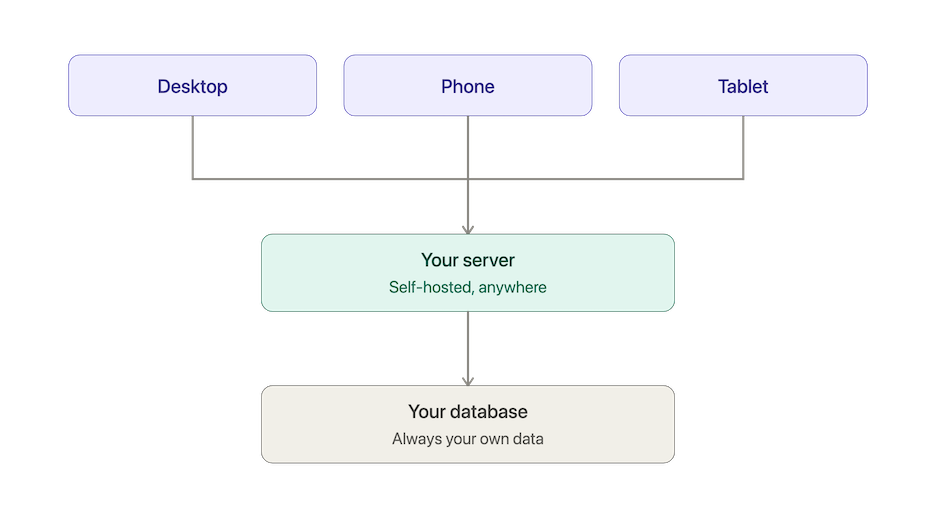
Choose your setup
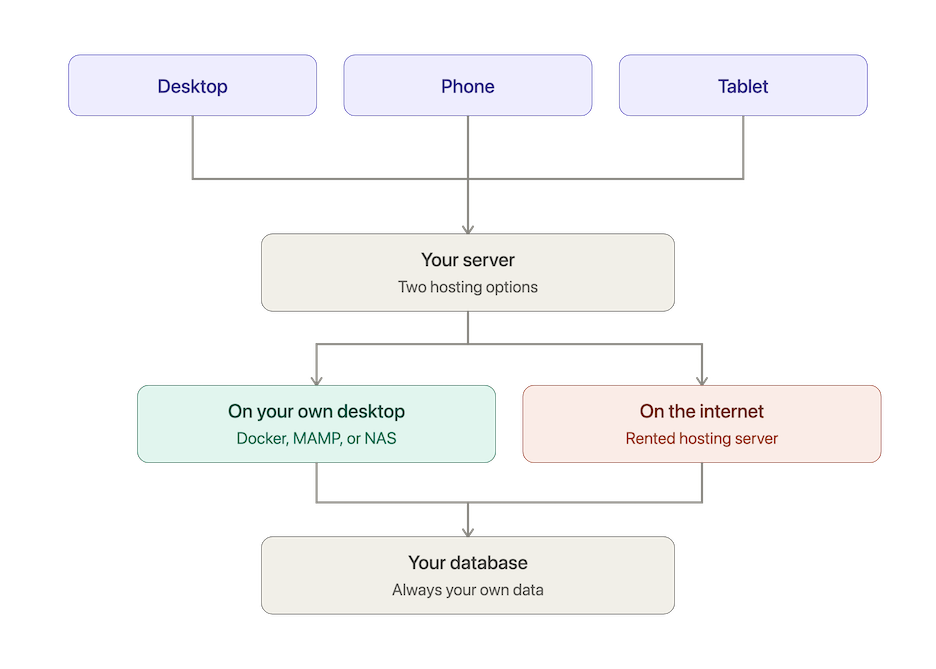
“The options below fall into two families — pick your branch first, then the specific option that suits you.”
1. MAMP or XAMPP — free, local, no Docker needed
MAMP (Mac) and XAMPP (Windows or Mac) are free applications that set up a local web server on your own computer in minutes. No Docker, no command line, no technical knowledge required. Install MAMP or XAMPP, drop in our app files, and you’re running. Data stays entirely on your own machine. Ideal for trying the software out or for a single-location practice.
Download the standard (non-Docker) zip for your product after completing the download form, then follow the Standard Self-Install tab in our install guide. A built-in setup wizard walks you through the first-run configuration.
2. Docker Easy Install — free, local, most reliable
Our Docker Easy Install is the simplest and most reliable cross-platform route for a permanent local setup. One installer, works the same on Mac and Windows, easy to update. Still local only — but rock solid for a single location.
3. NAS (Synology etc.) — always-on, local network
If you have a modern NAS device such as a Synology, it almost certainly runs Docker natively via Container Manager. The same Docker Easy Install zip runs directly on it — no Mac or Windows needed. Always on, low power, accessible by everyone on your local network. A great option for a small clinic or shared office. See the NAS section of the install guide for setup steps.
4. Shared hosting — low cost, accessible anywhere
Standard cPanel shared hosting (typically £5–6/month from providers like HostingUK) runs our software perfectly. You get browser access from anywhere, a proper HTTPS address, and cPanel’s excellent backup tools — without any server administration burden. A good fit for a practitioner or sole trader who wants internet access without the responsibility of managing their own server.
Download the standard (non-Docker) zip for your product after completing the download form, then follow the Standard Self-Install tab — web server section in our install guide. A built-in setup wizard walks you through the first-run configuration once the files are uploaded.
5. VPS — full control, accessible anywhere
A Virtual Private Server gives you the most control — your own private server in a data centre, accessible from anywhere, fully managed by you. More responsibility than shared hosting, but more flexibility. See below for the full detail.
What is a VPS?
A Virtual Private Server is your own private slice of a real server in a data centre — available on the internet around the clock, but belonging entirely to you.
Your data doesn’t sit alongside thousands of other people’s records on a shared platform. It lives on a server you control, backed up by you, accessible only to the people you authorise.
You get a real web address and a proper HTTPS security certificate. You can log in from any browser, on any device, from anywhere in the world.
Do our apps work on a VPS?
Yes — without any modifications. CrystalSolutions, PraxisClinic and SoleTrader run on a completely standard web stack (PHP 8.3, MySQL 8.0, Apache) which is the native environment of any modern VPS.
The same software, the same features, the same field-level AES-256 encryption — just running on a server you own rather than a computer under your desk.
What does it cost?
A capable VPS from Hetzner Cloud (a highly regarded European provider with servers in Germany and Finland) starts at around €4–5 per month.
A free HTTPS certificate via Let’s Encrypt is included as standard — the same technology used by banks and major retailers, at no extra cost.
Who is it for?
A VPS installation suits sole traders, self-employed practitioners and business people who:
- Need to access their records from multiple locations — home, office, clinic, on the road
- Have GDPR concerns about client or patient data stored on a third-party cloud platform
- Want full ownership and portability of their data
- Are comfortable with a small degree of technical responsibility — or have someone who can help with the initial setup
It’s a step up from our Docker Easy Install in terms of technical confidence required — we’re honest about that. But for the right person it’s the ideal setup: the convenience of cloud access with the privacy and control of self-hosted software.
Field-level encryption
All three of our applications include optional AES-256-CBC field-level encryption for sensitive records. When enabled, a compromised server or stolen database backup exposes only unreadable ciphertext — not client or patient names, addresses, contact details or business or clinical notes.
This makes internet-accessible deployment a realistic and defensible option even under GDPR Article 32 requirements for appropriate technical security measures.
You can read more about how we approach data security in our Privacy Policy.
Available Now
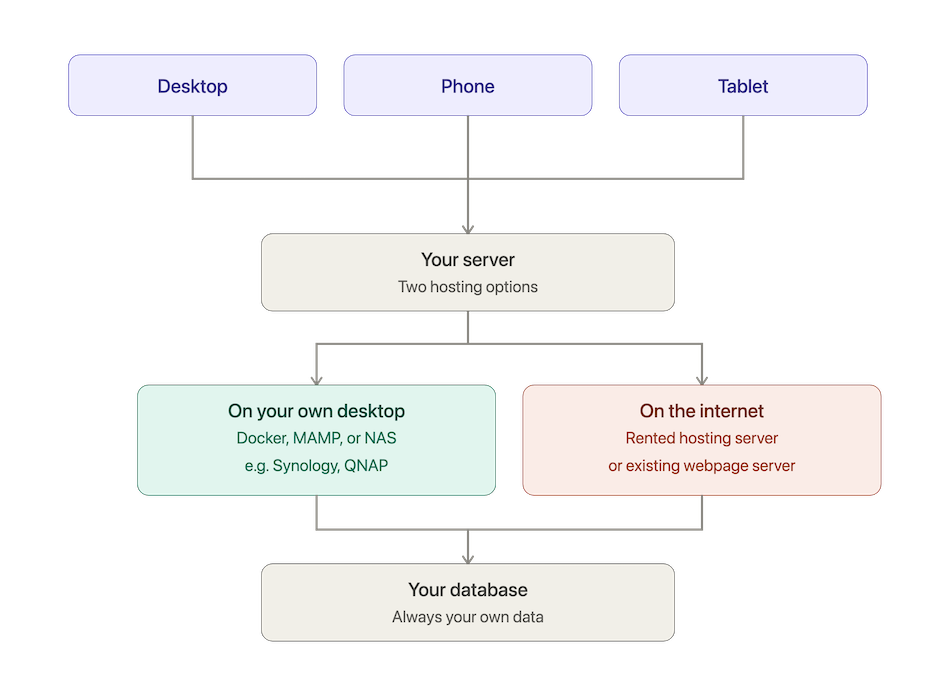
Either way, it’s the same software and the same data — always yours.
If you have a technically confident friend or colleague who could set this up for you, we’ve put together a plain-English guide they can follow — everything they need to know is in there.
Our guided VPS setup option — a simple text guide describing the technical steps, making the process as straightforward as our existing Docker installer which it uses.
If you have questions about VPS hosting for your business or practice, have a look at the discussion on our forum or get in touch via our contact page.
Privacy Policy ·
CrystalSolutions & PraxisClinic ·
SoleTrader ·
Forum
**What we'd suggest for most people**

If you mostly work from one location, the simplest and cheapest options
are usually best: a NAS you already own, or a Docker install on your own
PC or Mac. No monthly bill, no new hardware, no third party in the loop
— just the software running on something you already have.

A shared hosting, a VPS or your own existing website hosting is the natural next step up if you need to reach your records from more than one place.

We wouldn't generally point most sole traders and small practices toward a commercial cloud platform — for this scale of use, it adds cost and complexity without a real benefit over the options above.